Budget
Paisa supports a simple budgeting system. Let's say you get 50000 INR at the beginning of the month. You want to budget this amount and figure out how much you can spend on each category.
Let's add a salary transaction to the ledger:
Now you have 50k in your checking account. Let's budget this amount:
~ Monthly in 2023/08/01
    Expenses:Rent               15,000 INR
    Expenses:Food               10,000 INR
    Expenses:Clothing            5,000 INR
    Expenses:Entertainment       5,000 INR
    Expenses:Transport           5,000 INR
    Expenses:Personal            5,000 INR
    Assets:Checking
The ~ character indicates that this is a periodic transaction. This is not a
real transaction, but used only for forecasting purposes. You can read more
about
periodic expressions
and
periodic transactions.
Bug
Even though the interval part is optional as per the doc, there is a
bug in the ledger-cli, so you can't use ~ in 2023/08/01,
instead you always have to specify some interval like ~ Monthly in 2023/08/01.
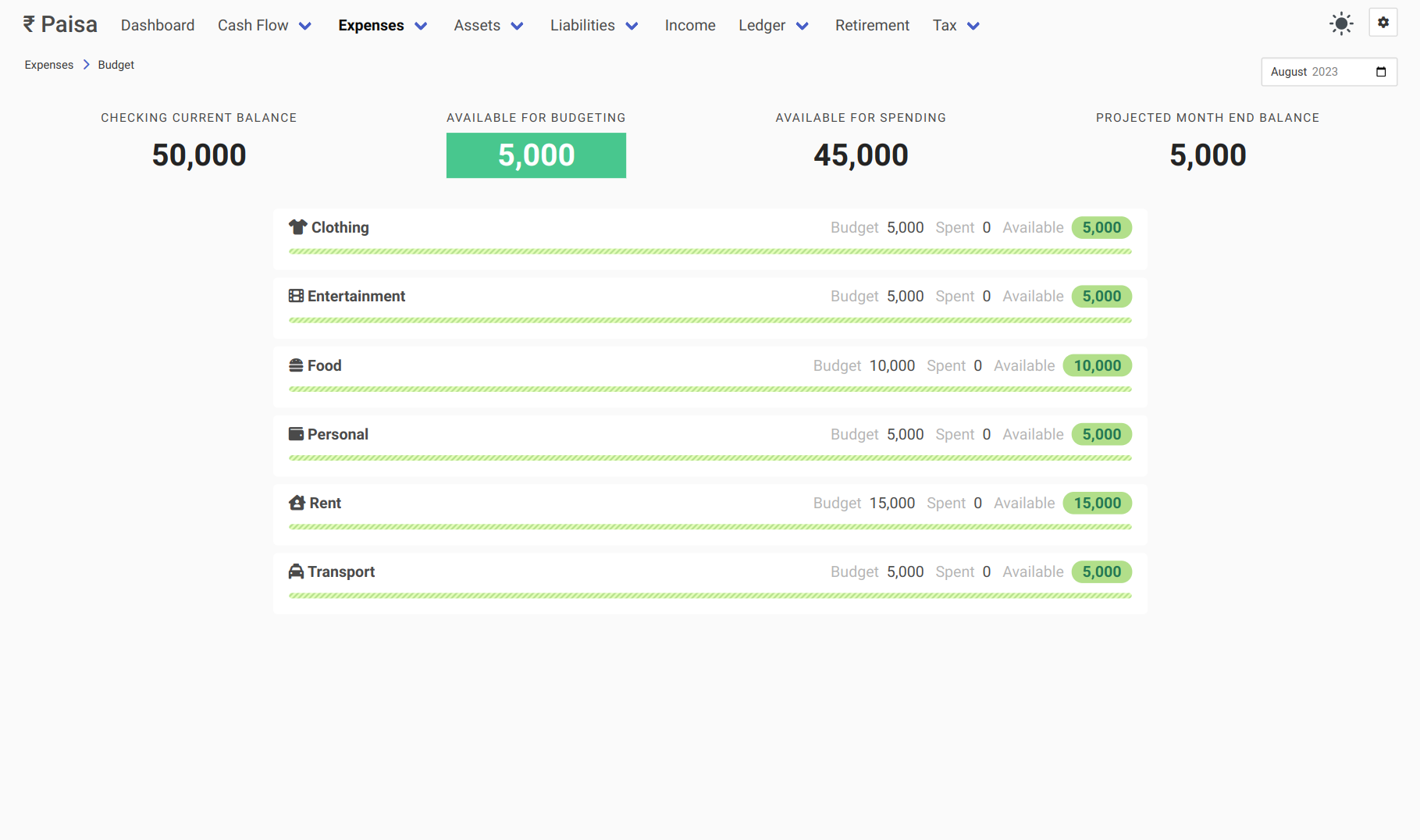
Now you can see that you will have 5k left in your checking account at the end of the month, if you spend as per your budget. Before you spend, you can check your budget and verify if you have money available under that category.
Let's add some real transactions.
2023/08/02 Rent
    Expenses:Rent               15,000 INR
    Assets:Checking

2023/08/03 Transport
    Expenses:Transport           1,000 INR
    Assets:Checking

2023/08/03 Food
    Expenses:Food                8,500 INR
    Assets:Checking

2023/08/05 Transport
    Expenses:Transport           2,000 INR
    Assets:Checking

2023/08/07 Transport
    Expenses:Transport           3,000 INR
    Assets:Checking

2023/08/10 Personal
    Expenses:Personal            4,000 INR
    Assets:Checking

2023/08/15 Insurance
    Expenses:Insurance           10000 INR
    Assets:Checking
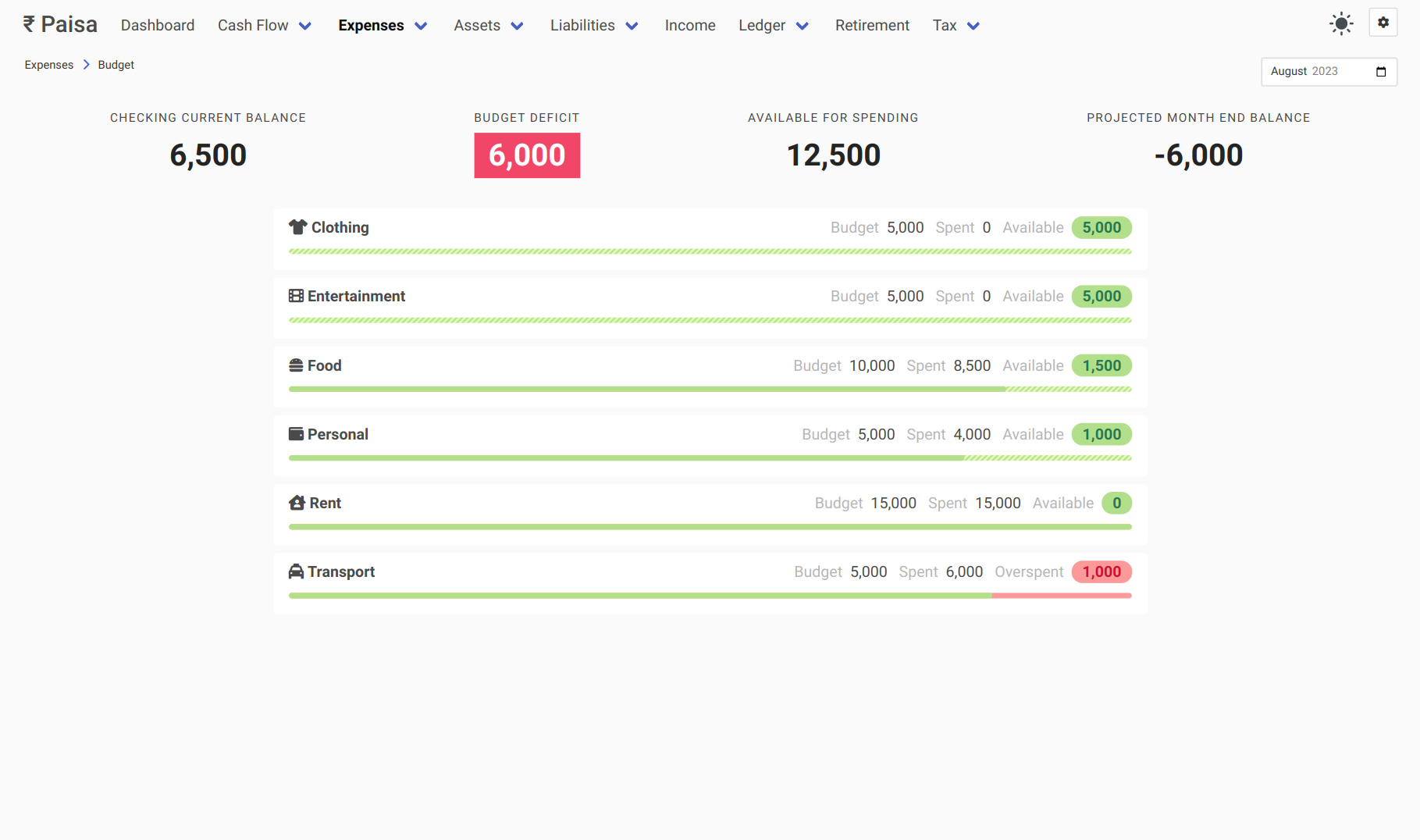
As the month progresses, you can see how much you have spent and how much you have left. You notice that you have overspent on transport and you have missed the insurance payment. You have a budget deficit now. That means, you can't actually spend as per your budget. You have to first bring the deficit back to 0. Let's cut down the entertainment and clothing budget to 0
~ Monthly in 2023/08/01
    Expenses:Rent              15,000 INR
    Expenses:Food              10,000 INR
    Expenses:Clothing               0 INR
    Expenses:Entertainment          0 INR
    Expenses:Transport          5,000 INR
    Expenses:Personal           5,000 INR
    Assets:Checking
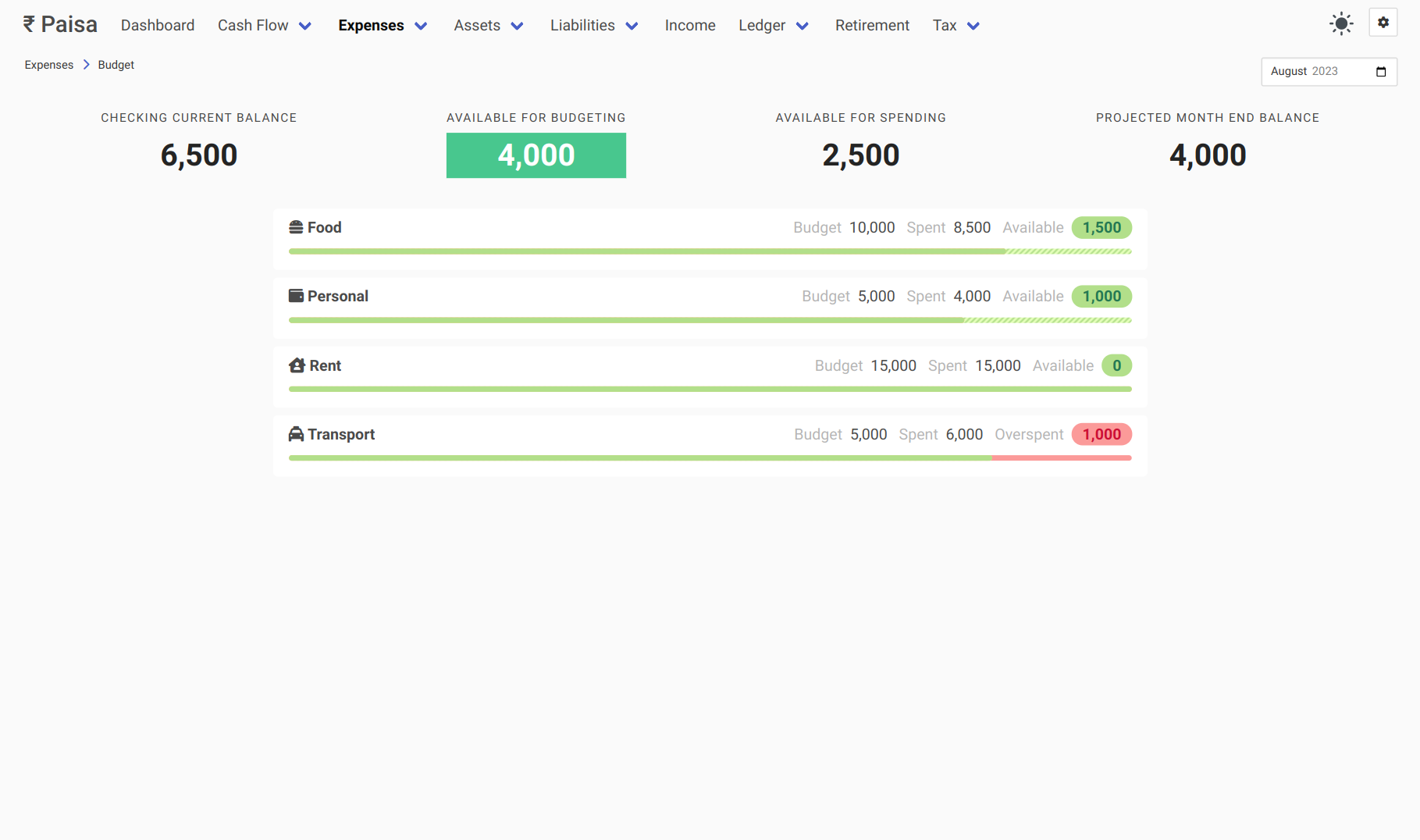
You can go back and adjust your budget anytime. Let's move on to the next month, assuming you haven't made any further transaction.
2023/09/01 Salary
    Income:Salary:Acme        -50,000 INR
    Assets:Checking

~ Monthly in 2023/09/01
    Expenses:Rent              15,000 INR
    Expenses:Food              10,000 INR
    Expenses:Clothing           5,000 INR
    Expenses:Entertainment      5,000 INR
    Expenses:Transport          5,000 INR
    Expenses:Personal           5,000 INR
    Assets:Checking
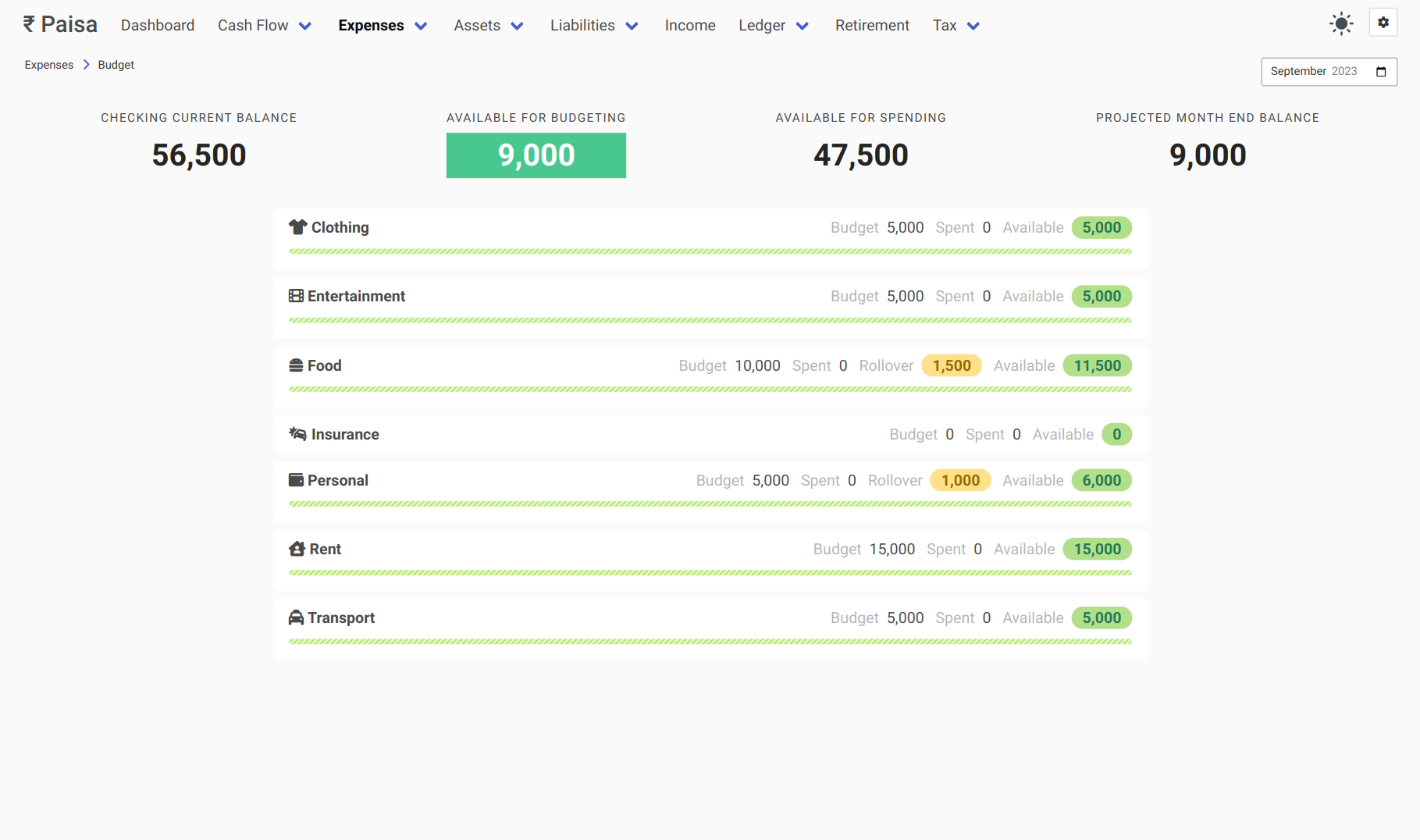
You can see a new element in the UI called Rollover1. This is basically the amount you have budgeted last month, but haven't spent. This will automatically rollover to the next month. That's pretty much it.
To recap, there are just two things you need to do.
-
Create a periodic transaction at the beginning of the month when you get your salary.
-
Adjust your budget as you spend and make sure there is no deficit.
Spending forecast
For the current month, Paisa estimates where each category may finish. Your envelope remains the planned amount; Projected Spend is an early warning, not a new budget.
How the projection is chosen
Paisa uses the following rules in order:
-
Historical Timing (Primary): If at least 3 completed historical months contain spending in this category, Paisa calculates the median fraction of monthly spending historically incurred by today's calendar day ($ProgressShare = \frac{SpentDay_{1..T}}{SpentTotal}$). If $ProgressShare \ge 5\%$, month-end spend is projected as: $$\text{Projected Spend} = \frac{\text{Observed Spend through Today}}{ProgressShare}$$ This pattern-aware model naturally handles front-loaded expenses (such as rent or subscription fees paid on Day 2) without falsely alerting that spending will balloon $15\times$.
-
Historical Median (Fallback): If historical timing has $< 5\%$ progress share (e.g. typical spending occurs later in the month), Paisa falls back to the median full-month total across available historical months.
-
Calendar Pace (Linear Fallback): When insufficient historical months exist ($< 3$ samples), but at least 3 calendar days have elapsed in the current month ($T \ge 3$), Paisa projects spending linearly based on the month's elapsed days: $$\text{Projected Spend} = \text{Observed Spend through Today} \times \frac{\text{Days in Month}}{\text{Elapsed Days}}$$
-
Insufficient data: During the first two days of a month without enough history, Paisa waits for more data instead of extrapolating from a very small sample.
Future-Dated Postings and Rollover Semantics
- Observed vs Future Spend: Paisa separates spending observed through today from future-dated postings already entered for later in the month. The month-end projection is strictly bounded below by actual recorded spend: $\max(\text{actual}, \text{pacingProjection})$.
- Effective Budget with Rollover: Categories with positive rollover benefit from expanded capacity. Health thresholds compare projected spend against: $$\text{Effective Budget} = \text{Planned Budget} + \max(\text{Rollover}, 0)$$ Deficit rollovers ($\text{Rollover} < 0$) are preserved as factual deficits.
Health Statuses
| Status | Condition | Meaning |
|---|---|---|
| Overspent | $\text{Actual} > \text{Effective Budget}$ | Category is already overspent today. |
| Likely Over | $\text{Projected} > 1.05 \times \text{Effective Budget}$ | Spending pace is projected to exceed budget by $> 5\%$. |
| At Risk | $\text{Projected} \ge 0.95 \times \text{Effective Budget}$ | Spending pace is within $5\%$ of the budget threshold. |
| On Track | $\text{Projected} < 0.95 \times \text{Effective Budget}$ | Spending is safely within the allocated envelope. |
| Insufficient Data | Early in month with $< 3$ days & $< 3$ historical months | Pending further spending data. |
Budget forecasting applies exclusively to the active current month. Historical months present factual ledger actuals, while future months display planned budget envelopes.
-
If you prefer to not have rollover feature, it can be disabled in the configuration page. ↩