Doctor
Open More → Doctor to find journal and valuation problems that affect Paisa's reports. It checks posting directions, prices, allocation configuration, investment reconciliation, and whether Scenario Planning has enough history.
Doctor is read-only. It links to records that need attention but never changes the journal or creates balancing entries.
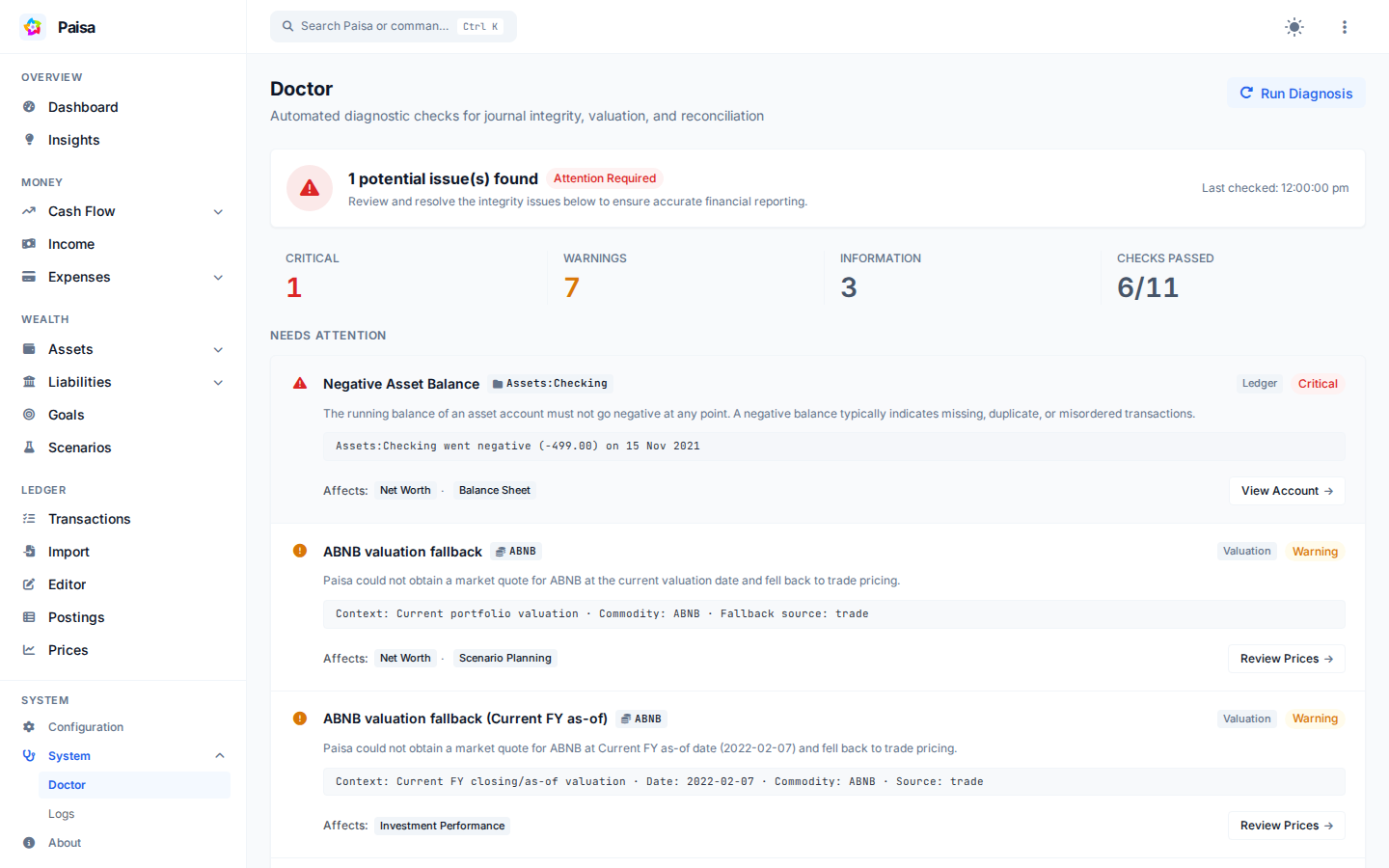
For example, Doctor may report that the latest price for NIFTY is 12 days
old. The finding explains that portfolio and net-worth values may be stale and
links you to the prices that need attention.
Checks
Doctor runs these checks:
| Check | Category | Code | Severity when Found |
|---|---|---|---|
| Asset balance integrity | Ledger | negative_asset_balance |
Danger |
| Posting direction | Ledger | invalid_income_direction, invalid_expense_direction |
Danger |
| Exchange-price coverage | Valuation | missing_exchange_price |
Danger |
| Journal-price consistency | Valuation | journal_price_mismatch |
Warning |
| Allocation configuration | Allocation | allocation_target_missing_account |
Warning |
| Current valuation quality | Valuation | valuation_fallback |
Warning |
| Current FY valuation quality | Valuation | valuation_fallback |
Warning |
| Investment attribution | Investments | unattributed_investment_income |
Warning |
| Current FY reconciliation | Investments | investment_performance_reconciliation_failed |
Danger |
| Scenario history readiness | History | insufficient_income_history, insufficient_expense_history, insufficient_contribution_history, no_investment_activity |
Info / Warning |
| Scenario checking readiness | Configuration | no_checking_account |
Warning |
Check results
Every diagnostic check reports both its execution health and its finding status:
passed: The check completed successfully and found zero data quality issues.issues: The check completed successfully and identified one or more data quality issues (withmaxSeverityindicatingdanger,warning, orinfo).failed: Doctor encountered an unexpected execution error while running the check. A check failure is reported explicitly so data is never falsely claimed as healthy.
Severity
- Danger: An accounting violation or missing exchange rate can invalidate a balance or report.
- Warning: Paisa can continue, but a fallback or incomplete configuration makes a result partial or estimated.
- Info: A useful note, such as limited scenario history, that does not mean the journal is wrong.
Valuation checks
Doctor verifies commodity valuation using the same valuation logic as Investment Performance and Net Worth:
- Market price: Direct quote from external market sources or commodity price database.
- Trade fallback: Unit price derived from historical buy/sell transactions.
- Cost fallback: Acquisition cost from the original purchase.
When market quotes are unavailable, Paisa falls back to historical trade or cost pricing, resulting in a valuation_fallback issue.
Date range
Doctor evaluates valuation quality across two specific boundary contexts:
- Current portfolio valuation: The as-of valuation used by Net Worth and Scenario Planning.
- Default Investment Performance period: Opening and closing/as-of boundaries for the Current Financial Year (
current_fy).
Passing the current FY valuation check verifies the default performance view; it does not imply that every historical custom period has full market quote coverage.
Doctor also checks for journal price mismatches, flagging when a transaction's explicit unit price differs by more than 5% from the market price recorded on the same date.
Investment income and reconciliation
Income Attribution
Dividends and interest postings in investment accounts should be linked to specific investment commodities. Postings grouped under income that cannot be attributed to a specific asset holding emit unattributed_investment_income. This ensures return calculations accurately credit cash flows to the securities that generated them.
Portfolio Reconciliation
Doctor verifies the fundamental accounting identity on the entire investment universe (Assets:* excluding checking) across the current financial year:
$$\text{Closing Value} = \text{Opening Value} + \text{Net Contributions} + \text{Investment Return}$$
If this identity fails to hold within rounding tolerance, or if performance decomposition fails to reconcile, Doctor emits investment_performance_reconciliation_failed (Danger).
Scenario readiness
Scenario Planning calculates recurring baseline medians from up to six completed historical months:
- 1–5 completed months: Emits
insufficient_income_history,insufficient_expense_history, orinsufficient_contribution_historywith severity Info. The baseline is usable, but based on less historical data than usual. - 0 completed months: If an assumption has zero historical samples, Scenario Planning cannot project that component. The issue severity escalates to Warning.
- First-Time Investors (
no_investment_activity): If no investment activity exists in the ledger, Scenario Planning cleanly treats opening investments and monthly investment transfers as ₹0. Doctor emits an Info note explaining this baseline behavior and intentionally suppresses contribution history warnings. - Checking Account (
no_checking_account): Scenario Planning derives its liquid cash baseline fromAssets:Checking. If missing, Doctor emits a Warning.
Privacy and safety
- Privacy Mode: When privacy mode is enabled in Paisa, Doctor masks all account balances, transaction quantities, and currency amounts across summaries, issue details, and metadata attributes.
- Direct Navigation: Every issue provides direct navigation links (e.g.
Review Prices →,Review Allocation →,Open Transaction →) to view or edit the affected records in Paisa. - No Automatic Modifications: Doctor does not delete duplicate postings, alter prices, or create balancing transactions. Users retain complete control over ledger edits.